Certified Ethical Hackers v13 AI
This document includes additional knowledge, case studies, news, and tips for the CEH course and exam. These are supplemental knowledge. Use the official materials as your source of truth for the exam preparation.
- Certified Ethical Hackers v13 AI
- Admin: Using the Certification Platforms
- Exam Preparation
- Module 01 - Introduction
- Module 02 - Footprinting and Reconnaissance
- Module 03 - Network Scanning
- Module 05 - Enumeration
- Module 06 - System Hacking
- Module 07 - Malware Threats
- Module 08 - Sniffing
- Module 09 - Social Engineering
- Module 10 - Denial-of-Service
- Module 11 - Session Hijacking
- Module 12 - Evading IDS, Firewalls, and Honeypots
- Module 13 - Hacking Web Servers
- Module 14 - Hacking Web Applications
- Finding Hidden URLs
- OWASP Top 10
- Resources to Practice Web attacks
- Types of application vulnerabilities
- Cross-Site Scripting
- Side-Channel Attacks
- Cross-Site Request Forgery (CSRF)
- Parameter Tampering
- Server-side Request Forgery (SSRF)
- Verbose Error Messages
- What are APIs
- Static Analysis
- Dynamic Analysis
- Module 15 - SQL Injection
- Module 16 - Hacking Wireless Networks
- Module 17 - Hacking Mobile Platforms
- Module 18 - IoT and OT Hacking
- Module 19 - Cloud Computing
- Module 20 - Cryptography
Admin: Using the Certification Platforms
You should have some links for:
- ASPEN - https://aspen.eccouncil.org/Account/Login
- Create an account and enter your subscription code here for access to the learning materials (VitalSource)
- Lab platform - Found in Aspen allow with the e-books section.
Once you have purchased the course, you should have a subscription code that you need to get access to your course within Aspen.
Scheduling for Certification Exam
Your exam voucher is either an proctored online session, or proctored on-premise exam with your training provider.
Exam platform:
- https://www.eccexam.com/
- You will need to create an account at the exam platform.
- Once it is time to start your exam, you will need to put in your exam voucher code, and a Proctor ID. The Proctor ID will be given to you by the proctoring organisation. i.e. You should get the Proctor ID from Lhub when you are starting the exam.
Exam Preparation
https://cyberq.eccouncil.org/examprep
Cyber Quotient is EC-Council's own exam preparation platform which is the best resource to prepare for their exams. For pure self-learning students, you may have Cyber Q access. For students with training providers, you will have to check your package if it is included.
Exam Passing Score
The passing score is from 60% to 85%.
Source: https://www.eccouncil.org/train-certify/certified-ethical-hacker-ceh/
FAQ > Certifications > What are the pass rates
Study Tips
Other than cybersecurity concepts:
- Nmap Commands and the options for the different kinds of scans
- All things listed in a table format
- Tools names (impossible to remember them all, try to at least familiarize yourself)
- All legal and regulatory frameworks, including ISO standard numbers.
In general, MCQ exams for any certification tend to use these kinds of details for their question set.
Module 01 - Introduction
Information Security
- Confidentiality
- Integrity
- Availability
- Authenticity
- Non-Repudiation
Authenticity = "You are who you claim to be."
Non-repudiation = "You cannot later deny what you did."
Other important concepts
- Zero-Trust Architecture
- Defense-in-Depth
- Principle of Least Privilege
- Authorization vs Authentication
Techniques, Tactics, and Procedures
- https://attack.mitre.org/
Advanced Persistent Threat(APT) Groups
- https://attack.mitre.org/groups/
The Cyber Kill Chain
- https://www.lockheedmartin.com/en-us/capabilities/cyber/cyber-kill-chain.html
Zero-Trust
- https://learn.microsoft.com/en-us/security/zero-trust/zero-trust-overview
Module 02 - Footprinting and Reconnaissance
Passive Scanning
Passive scanning and open source intelligence is generally still in the legal space as the data is publicly available (e.g. if you run the google search)
If you access any exposed applications from the google search results that you do not have permission for, then that is illegal and is a cyber crime!
OSINT Framework
- https://osintframework.com/
Google Hacking Dataase
- https://www.exploit-db.com/google-hacking-database
Shodan Cheatsheet
- https://github.com/jakejarvis/awesome-shodan-queries
- https://infosecone.com/blog/shodan-cheat-sheet/
Website Tech Stack Recon
- Netcraft https://sitereport.netcraft.com/
- WhatWeb https://whatweb.net/
- WhoIs https://www.whois.com
- DIG for DNS https://toolbox.googleapps.com/apps/dig/
Internet Archive for older information
- https://archive.org/
Cases:
- IP Camera Hacking Dec 2025: https://www.bbc.com/news/articles/cj01q6p7ndlo
Module 03 - Network Scanning
Any network scanning that is done without explicit permission is illegal and is a cyber crime!
Nmap
- https://nmap.org/download
- https://nmap.org/book/man-bypass-firewalls-ids.html
- https://www.stationx.net/nmap-cheat-sheet/
- https://blog.cyberdesserts.com/nmap-nse-scripting-engine/
Module 05 - Enumeration
Dig deeper into each network service that is found.
For each service, look it up at https://book.hacktricks.wiki/en/index.html.
NetBIOS
- https://learn.microsoft.com/en-us/windows-server/administration/windows-commands/nbtstat
- https://www.techtarget.com/searchnetworking/definition/NetBIOS
SNMP
- https://linux.die.net/man/1/snmpwalk
- https://www.cisco.com/c/en/us/support/docs/ip/simple-network-management-protocol-snmp/7282-12.html
About Vulnerabilities
Common Weakness Enumeration
- https://cwe.mitre.org/
- Can be a weakness but not a vulnerability
- The weaknesses are general and applicable to any application
Common Vulnerabilities and Exposures (CVE)
- https://www.cve.org/
- Specific to the vulnerable application
Common Vulnerabilities Scoring System (CVSS)
- https://www.first.org/cvss/calculator/4-0
- Tells us the severity of the vulnerability.
- Tells us which vulnerabilities to priotize for remediation.
Micrsoft Security Resource Center
- https://msrc.microsoft.com/update-guide
Vulnerability Analysis Tools
- Nessus
- OpenVAS
- https://greenbone.github.io/docs/latest/22.4/kali/index.html
- OWASP ZAP
- Many, many tools
Module 06 - System Hacking
Wordlists
- https://github.com/danielmiessler/SecLists
- https://github.com/intelligencegroup-io/RockYou2024
- https://github.com/dw0rsec/rockyou.txt
Brute Forcing with Wordlists
- Burpsuite
- https://github.com/frizb/Hydra-Cheatsheet
Password Cracking with Wordlists
- John the Ripper
- Hashcat
Exploitation Tools
- Exploit-DB
- Metasploit: https://github.com/security-cheatsheet/metasploit-cheat-sheet
- Searchsploit
Buffer Overflow
- Main target is the Extended Instruction Pointer
- https://ronamosa.io/docs/hacker/bufferoverflow/windows/
- https://ctf101.org/binary-exploitation/buffer-overflow/
Windows
- SAM
- NTLM
- Kerberos
Windows Credential Attacks
- Pass-The-hash
- Pass-The-Ticket
- AS-REP Roasting: https://attack.mitre.org/techniques/T1558/004/
- Silver Ticket
- Golden Ticket
Active Directory
- https://github.com/SpecterOps/BloodHound
- https://github.com/PowerShellEmpire/PowerTools/tree/master
- https://github.com/PowerShellMafia/PowerSploit/
Privilege Escalation
- https://book.hacktricks.wiki/en/windows-hardening/windows-local-privilege-escalation/index.html
Exploits Against Vulnerabilities
Unquoted Service Paths
C:\\Window\sysWOW64\web server.exe

C:\\Window\sysWOW64\web < replace this w payload

"C:\\Window\sysWOW64\web server.exe"
Steganography
- https://www.aperisolve.com/
John the Ripper
If the cracking has already succeeded one, find the cracked password here
cat ~/.john/john.pot
Module 07 - Malware Threats
Malware Analysis
- https://www.virustotal.com/gui/home/upload
Reverse Engineering Disassemblers
- https://hex-rays.com/ida-free
- https://github.com/NationalSecurityAgency/ghidra
- Any debuggers like OllyDBG
Module 08 - Sniffing
Man-in-the-Middle
Client -> Attacker -> Server
Can be done physically on a mirrored switch port (https://www.gigamon.com/resources/resource-library/white-paper/to-tap-or-to-span.html).
Can be done via proxy, DNS attacks
- https://github.com/kgretzky/evilginx2
Sniffing Tools
Network Capture Tools
- https://www.comparitech.com/net-admin/wireshark-cheat-sheet/
CAM Table Flooding / MAC Flooding
CAM Table matches MAC address to physical Switch Port. This needs to support thousands of MAC addresses per port because the device connecting could be another switch with many other devices.
Attacker's goal is to fully fill the CAM table so that the switch changes to a "hub" by communicating in broadcast instead of unicast or multicast.
Since the switch is now broadcasting, any device on the switch can capture the traffic being sent.
At Data-link layer.
ARP Spoofing
ARP Table matches the IP address to MAC address.
Attacker's goal is to send malicious ARP request with the attacker's MAC address to take over a certain IP address. The attacker must block the original device from responding to the ARP check request.
Module 09 - Social Engineering
Real-time Deepfake
- https://medium.com/@lbq999/video-deepfakes-step-by-step-guide-deep-live-cam-to-real-time-face-swapping-d851602f687c
- https://thehackernews.com/2025/12/researchers-capture-lazarus-apts-remote.html
AI Social Engineering Cases
- https://edition.cnn.com/2023/04/29/us/ai-scam-calls-kidnapping-cec
Tools
- https://github.com/trustedsec/social-engineer-toolkit
- Evilginx3
- https://aware.eccouncil.org/
- https://getgophish.com/
Countermeasures
- Blocklists: https://github.com/Phishing-Database/Phishing.Database
Module 10 - Denial-of-Service
DoS can be any kind of attack that results in the service being slow, or even crashing.
Distributed Denial-of-Service(DDoS) is considered a network attack based on the zombies(botnet) being used.
Hacker groups and affiliates
In this module, there is mention of a main "Attacker" and the attacker's affiliates. Here is an example of a hacker group and how they get other hackers to join them as affiliates.
- https://www.itpro.com/security/cyber-crime/lockbit-developer-snared-in-latest-blow-for-infamous-hacker-group
- https://cybelangel.com/blog/lockbit-cybercriminal-guide/

(Source: https://cybelangel.com/blog/lockbit-cybercriminal-guide/)
The screenshot above is from LockBit, and they hacker groups can join them as affiliates.
Mitigations and Countermeasures
Firewalls:
- https://www.ceos3c.com/pfsense/install-pfsense-on-virtualbox/
ISP protection:
- https://www.singtel.com/business/products-services/cybersecurity/network-security/managed-ddos-protect
Web Server Rate Limiting:
- https://blog.nginx.org/blog/mitigating-ddos-attacks-with-nginx-and-nginx-plus
- https://blog.nginx.org/blog/rate-limiting-nginx
- https://www.secopsolution.com/blog/nginx-security-hardening-guide
Linux DDoS Protections UFW and Fail2Ban:
- https://webdock.io/en/docs/how-guides/security-guides/configuring-ufw-and-fail2ban-mitigate-basic-ddos-attacks
Module 11 - Session Hijacking
Session Hijacking is generally done at transport layer (TCP) and application layer where connections will establish sessions.
Sniffing, or man-in-the-middle attack must first be done before session hijacking can take place.
Important items to study for are the TCP sequence numbers and the session ID used in TCP session hijacking.
Evilginx3 essentially is a session hijacking proxy, which can bypass multi-factor authentication.
Module 12 - Evading IDS, Firewalls, and Honeypots
Intrusion Detection System only detects possible attacks and sends alerts. Intrusion Prevension Systems can detect and block attack attempts, but require much more processing power.
Active/Inline IPS
Internet -> Firewall -> IPS -> Intranet
The above connection sequence is called an in-line connection, where the IPS sites in front of your protected network, and all traffic will go through the IPS. This will enable the IPS to drop suspicious packets.
However, since the traffic of the whole network passes through the IPS, the computational power needed to have a fast network is quite large. This will incur huge costs for hardware, such as Netgate appliances (https://www.netgate.com/appliances).
Passive/Out-of-Band IDS
Internet -> Firewall -> Switch -> Intranet
                          |
                          |
                          ------> IDS
In the above out-of-band deployment, data from the internet can be copied and sent to the IDS. This will save processing power but in-turn, will not be able to block attacks as the attack have already went into the network.
Combination
If budget allows, both IDS and IPS can be deloyed.
... -> Switch -> Intranet -> IPS -> Sensitive Subnet
         |
         |
         ------> IDS
In the above example, an IPS is deployed in front of a subnet which an increased layer of protection is required.
Port Mirroring
Copying packets is also called port mirroring. Managed switches can copy all traffic through a switch port to another port for monitoring.
SPAN ports are available on Cisco Switches. Network TAPs can also be used.
- https://www.niagaranetworks.com/solutions/tap-versus-span
Tools
Firewall
- https://www.pfsense.org/
IDS/IPS
- https://www.snort.org/
- https://suricata.io/
Suricata and snort can be installed easily with Pfsense.
Rules for IDS/IPS
- https://rules.emergingthreats.net/
- https://rules.emergingthreats.net/open/
The "Open Emerging Threats" is available to use for free.
Snort Rule
The rules can be used to set detection requirements, source and destination IP addresses, ports, and messages sent to the logs or alerts.
alert tcp $EXTERNAL_NET 80 -> $HOME_NET any
(
    msg:"Attack attempt!";
    flow:to_client,established;
    file_data;
    content:"1337 hackz 1337",fast_pattern,nocase;
    service:http;
    sid:1;
)
Source: https://docs.snort.org/rules/
Network Access Control (NAC)
https://www.cisco.com/site/us/en/learn/topics/security/what-is-network-access-control-nac.html
Honeypots
- https://github.com/paralax/awesome-honeypots
Evasion Techniques
Additional Symbols to Fool String Patterns
| User input | Seen at Destination |
|---|---|
| p^o^w^e^r^s^h^e^l^l | powershell |
For example, p^o^w^e^r^s^h^e^l^l could be allowed through the IPS but is interpreted as "powershell" at the destination. This results in code execution attacks.
Packet Fragmentation
Network packets can be sent fragmented or out-of-order. The IDS/IPS will not be able to see the full compiled packet at the destination.
Mitigations
Traffic Normalization
- https://www.usenix.org/conference/10th-usenix-security-symposium/network-intrusion-detection-evasion-traffic-normalization
Normalization ensures the IDS/IPS sees exactly the same thing the target host will see. For example out of order packets are assembled at the IDS as well for detection.
Module 13 - Hacking Web Servers
Web servers and applications are usually scanned as a single whole during black box testing, but they are different technology stacks.
For example, a popular web stack is LAMPP
- Linux OS
- Apache Web Server
- PHP Web Application
- Perl
This module looks at the web server. The web server will handle the HTTP request and response behaviours, as seen in the Nginx rate limiting. We can enforce TLS and ecryption ciphers to be used.
Popular Web Servers
- Apache
- Nginx
- IIS (Windows Server)
- https://www.milesweb.co.uk/blog/hosting/web-server-types-web-servers/
Network Services
This module also mixes in network services such as FTP, SSH, SMB, and other network services.
In practice, the general attack pathways for this is similar to that in the previous modules. For each service found, use ExploitDB or Hacktricks to attempt the attacks.
The manual attacks on Network services is also important for the CEH exam.
Public DNS Attack
- https://umatechnology.org/googles-public-dns-servers-hijacked-traffic-redirected-for-more-than-22-minutes/
Module 14 - Hacking Web Applications
This module focuses on the Web Applications.
Popular Web Applications:
- Wordpress (PHP)
- Laravel (PHP)
- Django (Python)
- Express (Node.JS)
- Ruby on Rails
- Many more...
Finding Hidden URLs
Dictionary attacks to find hidden URLs
- https://commandmasters.com/commands/dirbuster-linux/
- https://github.com/OJ/gobuster
We can find files, DNS, VHOSTS, subdomains with these attacks.
OWASP Top 10
- https://owasp.org/www-project-top-ten/
- https://owasp.org/Top10/A00_2021_Introduction/
Resources to Practice Web attacks
- https://owasp.org/www-project-juice-shop/
- https://github.com/webpwnized/mutillidae-docker
- https://github.com/digininja/DVWA
Types of application vulnerabilities
OWASP
- https://owasp.org/www-community/vulnerabilities/
Others
- https://brightsec.com/blog/local-file-inclusion-lfi/
- https://www.imperva.com/learn/application-security/rfi-remote-file-inclusion/
Command injection
Example for Command Injection in Linux
# Example URLs that sends user inputs directly to a bash command
https://example.com?ping=
https://example.com?nslookup=
https://example.com?ping=[user input]

https://example.com?ping=10.0.2.2

# Command Injection is to try and join commands together in the request.
# use ; to join two commands.
# in bash, this is how we can combine two commands into one line.
ping 10.0.2.2; cat /etc/passwd

# Attacker simply adds the ; and command to be injected into the URL
https://example.com?ping=; cat /etc/passwd
# The following command will be run in the server
ping ; cat /etc/passwd
Cross-Site Scripting
Uses malicious javascript on the clients machine.
Can be used for many attacks such as session hijacking techniques, crypto mining etc.
- https://github.com/PiTi2k5/Crypto-Webminer
Filter Evasion Cheatsheet
- https://cheatsheetseries.owasp.org/cheatsheets/XSS_Filter_Evasion_Cheat_Sheet.html
Side-Channel Attacks
Time-based side channel attack
Below is an example of a time-based side-channel attack where attackers look at the time used for processing data to make inferences.
Case 1: login with username that does not exist. Total four steps is required.
request -> webserver -> database -> check username.
Case 2: login with username that does exist. Total five steps is required.
request -> webserver -> database -> check username -> check password
The timing of the response if username does not exists vs exists will be minute but different, and the behavior is repeatable.
This is just an example to illustrate the timing using "steps" for easier understanding.
Cross-Site Request Forgery (CSRF)
CSRF will cause the client or victim to send a request to a different server. For example, we have this URL of a shopping cart that has some parameters for
https://shopping.com?buy=1&product_id=543&qty=50&price=8000.00&delivery_address=sembawang
Victim logs in to the shopping site. So the victim's browser is legitimately authenticated.
Attacker sends phishing link with a different delivery address
https://shopping.com?buy=1&product_id=543&qty=50&price=8000.00&delivery_address=changi
The purchase is sent to the attackers delivery address.
Because the victim clicks on the link and initiates the transaction,
the request happens on the client-side.
Parameter Tampering
The act of causing a client to trigger the attack is CSRF. The attack triggered in the XSS example by changing the GET Parameters in the URL is also called Parameter Tampering
XSS and CSRF
Because Javascript can be executed on the client side if there is a XSS vulnerability, Javascript and XSS attacks can be used to initiate the CSRF via accessing the poisoned page.
Server-side Request Forgery (SSRF)
SSRF will cause the server to send a request to another server.
For example, a web URL can access local html files like this.
https://example.com?page=index.html
The example request flow is like this:
Client -> server -> index.html
                        |
Client <- server <-------
If the server and application is vulnerable to SSRF, attackers request to access another URL for another website.
The example attack
https://example.com?page=https://internal.server.com
The example request flow is like this:
Client -> server -> https://internal.server.com
                        |
Client <- server <-------
In this case, we have accessed the internal web server that should not have been accessible from the public.
Mitigation for SSRF is simple disallow requests to anything of remote origin. Whitelisting of domains allowed may be needed to allow external javascripts and other resources to be loaded.
Verbose Error Messages
Web apps should not show too much information on encountering any errors.
username:john
password:123534
*john does not exist

username:smith
password:123534
*Wrong password
In the above table, the web application specifies username and password errors. The the second example, since the error message is that "*Wrong password", we can infer that "smith" is a username that exists.
What are APIs
APIs are a function of the webapp that returns smaller pieces of data, instead of the whole HTML page.
For example, we can send a request to retrieve a user profile
https://example.com/api/get_profile?username=john
The response will look like
{
  "username":"john",
  "email":"me@john.com",
  "Expiry":"31-12-2030"
}
APIs used for fast exchanges of data, and in single-page applications where the page is updated in the browser by javascript request for data in the browser.
SOAP vs REST API
- SOAP uses XML
- https://www.geeksforgeeks.org/websites-apps/difference-between-rest-api-and-soap-api/
Static Analysis
- https://snyk.io/
Dynamic Analysis
- https://owasp.org/www-project-web-security-testing-guide/v42/
- https://portswigger.net/web-security
Module 15 - SQL Injection
SQL Injection can lead to leakage of data, login, and even a reverse shell.
An SQL table is like an excel sheet with rows and columns.
-- Example SQL query for a login page
SELECT * FROM user_table WHERE username='' AND password='';
-- This reads in plain english as such
-- Select all items from the table called "user_table" and match the username and password.
An SQL Injection attack query can be as simple as a single quote.
-- If we put in a single quote in the username field, let's see what happens
SELECT * FROM user_table WHERE username=''' AND password='';
We notice that there is now an extra single quote, resulting in a syntax error. If we see an error on the browser, then this is called an error-based SQL injection.
Now let's see how else we can manipulate the user input.
-- We will now perform an "Always True" Attack
-- The attack string will be => ' or 1=1
SELECT * FROM user_table WHERE username='' or 1=1' AND password='';
-- This reads in english "Select all items from the table called "user_table" and match the username='' or True."
We have inserted ' or 1=1 in the username field, and the interpretation is shown above. However, there is still a syntax error, but you see where we are trying to manipulate.
-- The attack string will be => ' or 1=1; --
SELECT * FROM user_table WHERE username='' or 1=1; --' AND password='';
-- This reads in english "Select all items from the table called "user_table" and match the username='' or True.". Notice that there is no syntax error anymore.
By inserting ' or 1=1; --, we have put in a comment line with the two dashes, which will cause SQL to ignore any string behind the dashes.
Finally, let's look at how the query is interpreted.
SELECT * FROM user_table WHERE username='' or 1=1; --' AND password='';
SELECT * FROM user_table WHERE username='' or 1=1;
SELECT * FROM user_table WHERE 1=1;
SELECT * FROM user_table;
Because of the or operator, SQL will just take the condition as true, and can finally be interpreted as just a simple select statement.
Cheatsheet
- https://portswigger.net/web-security/sql-injection/cheat-sheet
Practice for SQL Injection
- WebGoat https://owasp.org/www-project-webgoat/
Module 16 - Hacking Wireless Networks
To hack Wi-Fi, a network card with monitoring mode is required.
Hardware for Wi-Fi
- Wi-Fi Pineapple https://hak5.org/
- Alfa brand USB Wi-Fi adapters
Hardware for other signal attacks
- Flipper Zero
BSSID vs SSID
This is a common source of confusion.
| Name | Description |
| --- | --- |
| BSSID | The MAC Address of the Access Point |
| SSID | The Wi-Fi name that is broadcasted |
https://www.differencebetween.net/technology/difference-between-bssid-and-ssid/
Module 17 - Hacking Mobile Platforms
Mobile Devices includes Laptops, Tables, Smart phones.
Company Policy for Devices
| Name | Description |
|---|---|
| Bring Your Own Device(BYOD) | Personal devices used for business as well. There is potential mixing of personal and enterprise data. |
| Company Owned, Personal Enabled(COPE) | Company owned devices, but personal use is allowed. There is potential mixing of personal and enterprise data. |
| Company Owned, Business Only(COBO) | Company owned devices, only for work data. |
| Choose Your Own Device(CYOD) | Similar COPE, but with a pre-approved list of devices that employees can choose from |
See CompTIA Security+ for more information.
Other resources
- https://insights.samsung.com/2022/12/06/byod-cyod-cope-cobo-cosu-what-do-they-really-mean/
- https://www.techtarget.com/searchmobilecomputing/definition/CYOD-choose-your-own-device
OWASP For Mobile
- https://owasp.org/www-project-mobile-top-10/
- https://mas.owasp.org/MASTG/
Android VA Tool
- https://github.com/ReversecLabs/drozer
- https://blog.geekinstitute.org/2025/05/hacking-android-devices-using-msfvenom.html
- Metapsloit
Android Debugging
Phonesploit with Android ADB Connection
- https://developer.android.com/tools/adb
Module 18 - IoT and OT Hacking
Internet-of-Things(IoT) can be understood as any devices that is connected via a network. Modern IoT can connect via different protocols like Wi-Fi or Bluetooth.
Operational Technology specifically refers to Industrial Control Systems(ICS) with components like SCADA, Programmable Logic Controllers(PLC), Human Machine Intreface(HMI), etc. Modern OT protocols can connect over traditional networks such as Modbus/TCP.
There is a convergence between IoT and OT, however, OT strictly refers to ICS technologies.
At least, as of this writing, the implied technologies and purpose of the network are different.
Purdue Model
The Purdue Model is very important for any understanding of OT.
| Purdue Model Layer | Category | Purpose |
|---|---|---|
| Layer 4/5 | Enterprise IT for Business Logistics | This is where the standard computer network IT architecture is found |
| Industial DMZ | DMZ | The DMZ between Enterprize layers and OT Layers. Firewalls, IPS/IDS is placed here. |
| Layer 3 | Manufacturing Operation | Logging Historians, file servers, Manufacturing Execution Systems (MES) is here to bridge between enterprse systems and ICS systems. e.g. a Jump server to connect from IT to a remote control HMI application |
| Layer 2 | Supervisory Control | HMI, SCADA is here. |
| layer 1 | Basic Control | PLC,RTU controllers are here |
| layer 0 | Physical Processes | Sensors and actuators are here. e.g. Pumps being turned on and off via sensor reading. |
Sources:
- https://www.zscaler.com/resources/security-terms-glossary/what-is-purdue-model-ics-security
- https://www.fortinet.com/resources/cyberglossary/purdue-model
TTPs for ICS
- https://attack.mitre.org/techniques/ics/
Cases
- https://www.channelnewsasia.com/singapore/unc3886-cyber-security-threat-actor-attack-singapore-5245791
- https://en.wikipedia.org/wiki/Colonial_Pipeline_ransomware_attack
Module 19 - Cloud Computing
Virtual Machines vs Containers
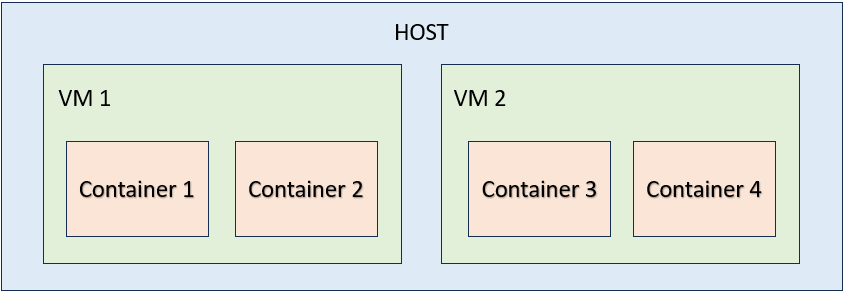
The simplest difference between VM and containers is:
| | |
| --- | --- |
| Virtual Machines | Host will dedicate resources such as CPU, RAM, vRAM. |
| Containers | Shares resources with host. Limiting resource usage is possible, but the resource is not dedicated. |
Containers can be run within a VM. In this case, the VM is the host for the containers.
Each container is usually hosting a single application or microservice. For example, a web app server and database is split into two containers.
Tools for Virtual Machine
- VirtualBox
- VMWare
- QEMU
- PROXMOX
Tools for Containers
- Docker: https://hub.docker.com/
- Podman: https://podman.io/
- Kubernetes: https://kubernetes.io/training/
Cloud Pentest Tools
- https://www.atomicredteam.io/atomic-red-team/docs/writing-cloud-atomics
- S3Scanners etc
Module 20 - Cryptography
Cryptography is the foundation of cybersecurity.
Differences between Important Terms
| Name | Description |
|---|---|
| Encoding | This is not an encryption. It is simply changing data representation so that it is understandable across systems. e.g. Base64 |
| Hash | Hashing is a one-way function that results in an output of fixed size. e.g. MD5 with 128-bit hash. Hashes are used to verify data integrity. One single change of bit in the data will result in a different hash. It is not possible to get back the original data from a hash value |
| Hash Digest | The fixed-size output of a hash function is also called a Digest. |
| Plaintext | The original data that is not encrypted |
| Encryption | A function that uses a key to convert plaintext data to an unreadable data. |
| Ciphertext | The encrypted piece of data. |
| Decryption | A function that uses a key to convert the ciphertext back to its original data. |
| Symmetric Key Encryption | Uses the same key to encrypt and decrypt |
| Asymmetric Key Encryption | Uses Private Key to Encrypt and Public Key to decrypt. Private key must be kept securely. |
Is Encryption Legal?
It seems to be but there are many countries that impose restrictions, resulting in the strongest encryption being "illegal".
- https://www.gp-digital.org/world-map-of-encryption/
Cryptography Tools
- https://www.dcode.fr/caesar-cipher
- https://cyberchef.org
Email Encryption
- https://proton.me/support/how-to-use-pgp
- Gmail, outlook all has their own encryptions.
Asymmetric Key Encryption Confusion
Asymmetric Key Encryption
Alice(sender)     ->      Bob(receiver)

Encrypt with B's Public Key

B will decrypt with his own private key
Digital Signatures
Alice(sender)     ->      Bob(receiver)
A encrypts the hash code with Alices' own private key.

B decrypts the hash code with A's public key.
Notice that private key and public key can be used for both encryption and decryption. It is simply a matter of usage of the keys.
Hash Collisions
Weak hashes such as MD5 can result in two pieces of data having the same hash output. This is called hash collision. Therefore MD5 cannot ensure data integrity.
MD5 Collision File Generator
- https://github.com/corkami/collisions
Random Numbers
Random numbers generated by computers are not truely random. Hence, if a random number is generated by an easy to guess algorithm, the generated number might be guessed by attackers. These random numbers are often used to generate secrets. Therefore weak random numbers creates weak secrets.
In Linux, we can use
# writes 20 random bytes
head -20 /dev/urandom > ~/urandom_20bytes
Source: https://askubuntu.com/questions/192203/how-to-use-dev-urandom
Lava Lamp used in encryption
- https://www.cloudflare.com/learning/ssl/lava-lamp-encryption/